

I see a painfully large amount of people waste their lives on stupid business ideas. We all have…
A friend gets giddy over some new online business he thought up after reading the daily newspaper for the first time in years. He runs around telling EVERYBODY how GREAT their lives will be after their product has hit the market.
We call these people “Wantrepreneurs”. They spend THOUSANDS of dollars and YEARS of their lives trying to fool themselves into believing they’re entrepreneurs. They get business cards, make Facebook pages, start Tweeting constantly, file for an LLC, open bank accounts…TONS of GARBAGE!
Don’t Be a Wantrepreneur!
Luckily for you, you are reading StartupBros and won’t be subject to the Wantrepreneur’s agony…
It is extremely easy to prove to yourself your business is a failure or a success with just a couple hours of effort. And it works for almost any idea.
(Watch Now: What’s the right business model?)
Let me show you exactly how we validate our business ideas for FREE…
Picking a name to start your business can be difficult. If you want a step by step guide to figure out how to come up with a name check out our article! We also wrote about the best logo makers you can use to launch quickly!
Step 1 – Create a Landing Page
The first thing we are going to do is make a landing page for our business idea (as if it is already an established business).
I use Unbounce (FREE) (Update: I now use LeadPages or ClickFunnels instead of Unbounce for this) to create all of my idea validation landing pages. Once you have an account and get familiar with it, it is very easy to use.
(Note – These tools now requires a credit card for their free trials, so you will have to remember to cancel after your done testing)
Here is one of the best performing landing pages we used to validate and test StartupBros…
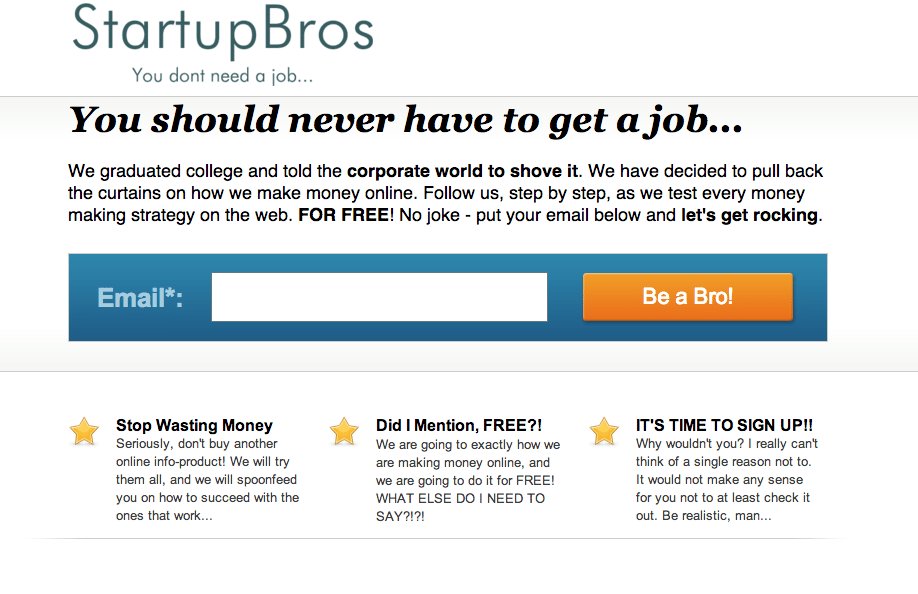
You can see, I don’t put much time into these landing pages. The goal is to get it up QUICK and make sure it is something that your target market would bite at.
If you’re not sold on this concept yet, take a look at this…
Here are some landing pages we used to test different taglines with StartupBros – you will 2 of 4 different taglines we were testing.
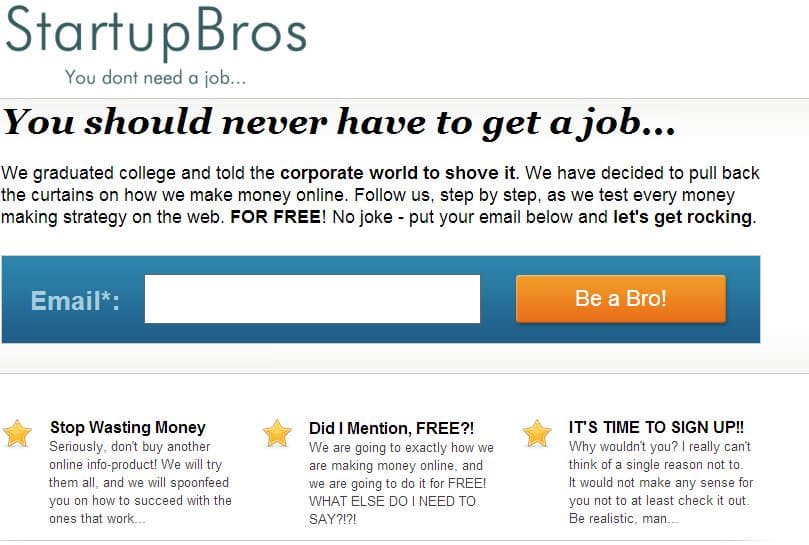
A familiar tagline – You don’t need a job…
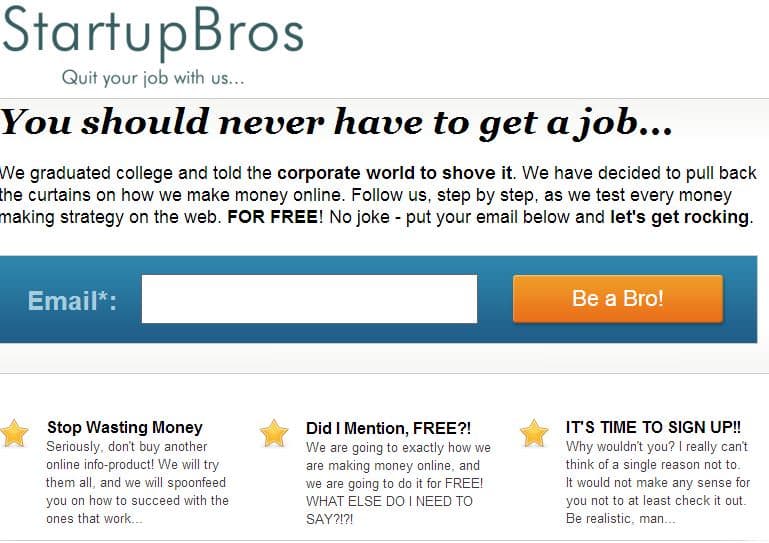
A loser of a tagline – Quit your job with us…
There’s literally NOTHING different but the taglines. I even toned down the logo tone to make sure the tagline alone was influencing conversions…
And boy, did it influence conversions! Take a look at the results –

Five words = 35% conversion rate INCREASE!
This test was a life-saver for StartupBros. I’m not saying StartupBros couldn’t be successful without the winning tagline, but why put yourself at a disadvantage like that?
This test showed us clear, reliable evidence that our target audience would be most receptive to the “You don’t need a job” tagline…
And a full 35% more receptive than the ‘Quit your job with us’ tagline.
35% conversion rate difference from five words…
That’s why it’s important that you take advantage of the A/B testing features on Unbounce/LeadPages when running validation tests. You’ll uncover insights that you didn’t know you didn’t know, and they’ll make all the difference in your business.
Test different headlines, different copy, different features, different prices, different colors…I test everything!
(Watch now: Should I drop out of college?)
Step 2 – Run a Small Ad Campaign
Now we’re going to run a small ad campaign using pretty much any platform we can (Facebook Ads, Google Adwords, Twitter Ads – whatever you can run for cheap/free).
All these platforms offer coupons for free advertising credits. You’ve probably seen them floating around the internet. They’re fairly easy to get.
If you don’t have any free advertising coupons, no worries. You know I’ve got the hookup for you!
I keep a running list of working methods on how to get free PPC Ad Coupons from ALL the ad networks. And of course, it’s free for you 🙂
If you need Free PPC Ad Coupons, click here!
I’ll be using Google Adwords to show you the method in this article, since those ad coupons are typically the easiest the get…
Make a new account and load up your Coupon. Go through the process to set up a new campaign and be sure to try to hit your target demographic as much as possible. Set your bidding option to Automatic Bidding to Maximize Clicks, with a max big target of $0.50. If you don’t get any clicks, raise this up 0.25 every couple hours until you do. Put your budget around $20/day. Setting up a good Adwords campaign is obviously much more in depth than this, but we are going purely for speed here, you don’t even know if your idea is good yet.
After you have your campaign set up, write some ads and throw some good keywords in the campaign. If you don’t know how to pick good keywords then don’t worry too much for now. Keyword selection is an in-depth topic and I’ll walk you through the process of keyword selection in an upcoming post.
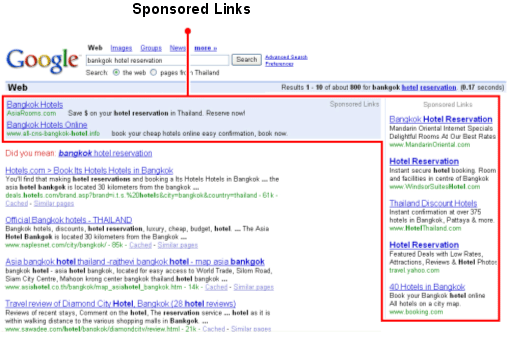
Your ad will show up in places like this
For now, check out the Google Keyword Tool and put a website similar to yours in the “Website” box. Then test some keywords that you’re thinking. Don’t be afraid to get specific with them. To get to the Keyword Tool go to www.google.com and type “Google Keyword Tool” and it’ll be the first thing that comes up (they’ve been moving the URL around recently so I didn’t want to give a link that would go bad tomorrow).
You can also run Facebook or LinkedIn ads for these types of tests (obviously), but I can’t hook you up with coupons for those 🙁
NOTE – Don’t forget to set up Conversion Tracking, or else this whole thing will be useless! In Adwords, set up Conversions under the Tools and Analysis section of your account. Take that script and put it on the confirmation popup on your Unbounce pages. Also, submit an entry into your landing page to make sure all tracking and lead capturing is working properly! If you have any trouble doing this, comment below and I will post a follow up!
Step 3 – Winner Winner Chicken Dinner! … or Try Again
Now you get to see what happens…
You will either start getting TONS of leads in your email, get a few leads, or get absolutely nothing. Be sure to contact your leads and find out as much as you can about them, their needs, etc. Start the sell!
You will soon find out if you have a smashing hit or a complete dud on your hands. People could start throwing money at you, or they may start cursing you out.
After a couple days you’ll have something that looks like this:
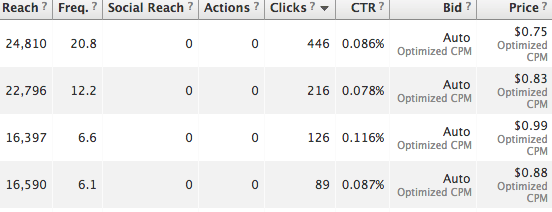
This will give you some additional numbers about customer acquisition costs for you to weigh against your revenue (or potential revenue). What copy worked well? What tone? Using this information you will be closer to determining the validity of your business.
Moving Forward
After running your tests and looking at all your data, you will have INFINITELY more perspective on if you want to move forward with your business idea; and if so, which direction to take it in.
Start it now! It doesn’t take a lot of time, you can eventually quit your job and it has a very real possibility at changing your life for the better. You have pretty much zero to risk here – GET AT IT!
More knowledge isn’t always the answer. Take action and never look back!
For real – when in all of history has it been possible to test a business in a week for $25 and an hour or two of work? It’s absurd not to.
And you did it all in a couple of days, for no cost but your time. Pretty nifty huh?
Now that we have a working tagline we can run a contest to create the perfect logo.
Let us know how this is working for you! Are there extra details you’d like to know? Add anything and everything below in the comments!
178 Comments
Love it, going to do that RIGHT NOW! Thanks, bros!
HELL YES LORENZO! If nobody else does anything with this post it was worth it :) Don't stop! Keep on it!
Let us know how it goes too!
I like what you are saying Will. Can you add a share button so I can share with my students?
Of course Kelly, I will add one right away! Are you looking for an e-mail share, or something to share to anywhere?
Thank you. A fb share where I could choose which fb voice I use would be great. An email share would work too.
Thanks for the reply Kelly, Ill be adding that immediately... You can disregard the email I hastily sent you :)
Love it! Straight out of the four hour work week. I've used a similar approach to verifying 8 of my last business ideas. Currently pursuing 2 of them.
Your template has a box that opens in the bottom right that has the default; "Your HTML-content goes here.."
Awesome - then you know as well as I do how awesome this type of validation testing is! Imagine the amount of time and money you saved just by running those little tests. I take it your web design company was one of the winning ideas?
Thanks a lot Mike - fixing it now. Appreciate the help.
Excellent advice, and thanks for making it practical. So many people get caught up in the first stage of starting a business -- the stage wherein they over-think the business without actually doing anything with it to test the idea (as I've written here http://www.bizopy.com/2012/10/24/testing-business-ideas-the-kickstarter-principle/). Your tips will come in handy to counter this problem.
Great post Dane, I couldn't agree with you more. 95% of aspiring entrepreneurs will sadly never get past the idea stage to the execution stage. As entrepreneurs, it is more valuable for us to <strong>FAIL FAST </strong>- it leads to quick learning and thus quick success!
I have been working on this idea for weeks, and was getting ready to buy about $10,000 worth of inventory, and take my idea to market. I came across this idea validation process from a reddit post, and am very thankful. I setup a placeholder site a few weeks ago, started working with suppliers, getting all my tax and business license info in place. Right now, it's all getting paused, and am running a validation. Thanks Bros!
The most awesome comment I've seen all month 8-)
Great article bros, I use a very similar approach with testing my ideas... quick, easy, measurable. Looking forward to reading more of your posts.
Unrelated, can you tell me what plugin you used in WordPress for that "Stay In Touch" thing inside a WordPress post? I like the look of it.
First time I ever heard of Unbounce. Sounds like a great service. And I like this blog already -- I tweeted it: https://twitter.com/volomike.
That is one of my favorite plug-ins ever - OptinSkin, were using it for all in-content forms. It also allows for a/b testing of forms, all sorts of design and placement features, direct integration into email service, etc... I highly suggest it! - https://startupbros.com/optinskin
Thanks a lot for the help Mike! Unbounce is awesome, my secret weapon for quick, high converting landing pages...